Cybersecurity researchers are tracking a fresh campaign that uses a new FileFix variant to deliver the StealC information stealer malware. The attack relies on a convincing, multilingual phishing site, advanced obfuscation, and anti-analysis tricks to avoid detection, according to an Acronis researcher, Eliad Kimhy, in a report shared with The Hacker News.
How the attack works, step by step
At a high level, the campaign uses social engineering to trick victims into running a first-stage payload, which then fetches apparently harmless images from a Bitbucket repository. Those images conceal the next-stage payloads, allowing attackers to hide malicious code inside content hosted on a legitimate source code platform, to bypass security controls.
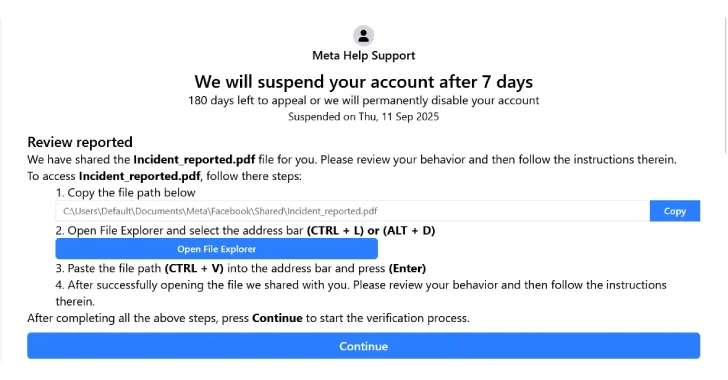
The phishing lure commonly takes the form of a fake Facebook Security page, presented in multiple languages to broaden reach. Victims are typically steered to the page from an email that warns their Facebook account may be suspended within a week, claiming posts or messages violate platform rules. They are instructed to appeal the decision by clicking a button.
The phishing pages are heavily obfuscated, with junk code and fragmentation used to make analysis harder. Once the victim clicks the appeal button, they are told they can access a PDF of the alleged policy violation, after copying and pasting the document path into File Explorer.
image import
FileFix, explained
FileFix, first shown as a proof of concept by researcher mrd0x in June 2025, differs from ClickFix in one important way, it does not require users to open the Windows Run dialog and paste an obfuscated command there. Instead, FileFix abuses a browser file upload feature to trick victims into copying a command into the File Explorer address bar, which then executes locally.
In the current campaign, clicking the phishing page’s “Copy” button appears to copy a harmless file path, but in reality it copies a malicious PowerShell command. The copied command is padded with trailing spaces so that when pasted, only the benign path is visible in File Explorer. The victim then clicks an “Open File Explorer” button, pastes the content, and unknowingly runs the hidden command.
That command executes a multi-stage PowerShell script, which downloads the image stored on Bitbucket, decodes it to reveal the next-stage payload, and eventually launches a Go-based loader. The loader unpacks shellcode that starts the StealC information stealer.
Why FileFix is effective, and how it differs from ClickFix
FileFix benefits from abusing a ubiquitous browser feature, rather than the Run dialog or a terminal, which might be disabled by administrators. This makes it easier to reach targets in environments where direct command execution might be restricted.
At the same time, Acronis notes that ClickFix has its own stealth advantages, since it is spawned from Explorer.exe via the Run dialog or a terminal. With FileFix, the browser executes the payload, which could make forensic traces more visible to investigators or security tools, depending on the environment.
“The adversary behind this attack demonstrated significant investment in tradecraft, carefully engineering the phishing infrastructure, payload delivery and supporting elements to maximize both evasion and impact,” Acronis said.
Related campaigns and additional techniques
The disclosure coincides with Doppel’s findings of other campaigns that combine fake support portals, Cloudflare CAPTCHA error pages, and clipboard hijacking, that is ClickFix, to socially engineer victims into running malicious PowerShell code. In those incidents, the PowerShell downloader retrieves and runs an AutoHotkey, AHK, script that profiles the infected host and fetches further payloads such as AnyDesk, TeamViewer, info-stealers, and clipper malware.
Doppel also observed variations where victims are guided to execute an MSHTA command pointing to a lookalike Google domain, wl.google-587262[.]com, which then retrieves and runs remote malicious scripts.
AHK, a Windows scripting language originally designed for automation, has been weaponized by threat actors since about 2019. Attackers use AHK to create lightweight droppers and info-stealers that masquerade as benign automation tools or support utilities.
Mitigations and detection tips
- Educate users to be cautious with unexpected emails that demand urgent action, such as account suspension notices, especially if they request copying and pasting commands or paths.
- Treat clipboard activity with suspicion, as attackers may use clipboard hijacking to replace copied text with hidden commands.
- Monitor for unusual PowerShell and browser-based command execution patterns, including scripts that fetch media files from code hosting platforms, then decode them.
- Apply content filtering and scanning for downloads from source code hosting sites used in unexpected contexts, such as images being used as payload carriers.
- Harden endpoint protections to detect obfuscated PowerShell chains, Go-based loaders, and shellcode unpacking behaviors.
- Block or alert on connections to suspicious domains like wl.google-587262[.]com, and on unusual Bitbucket resource access from non-developer endpoints.