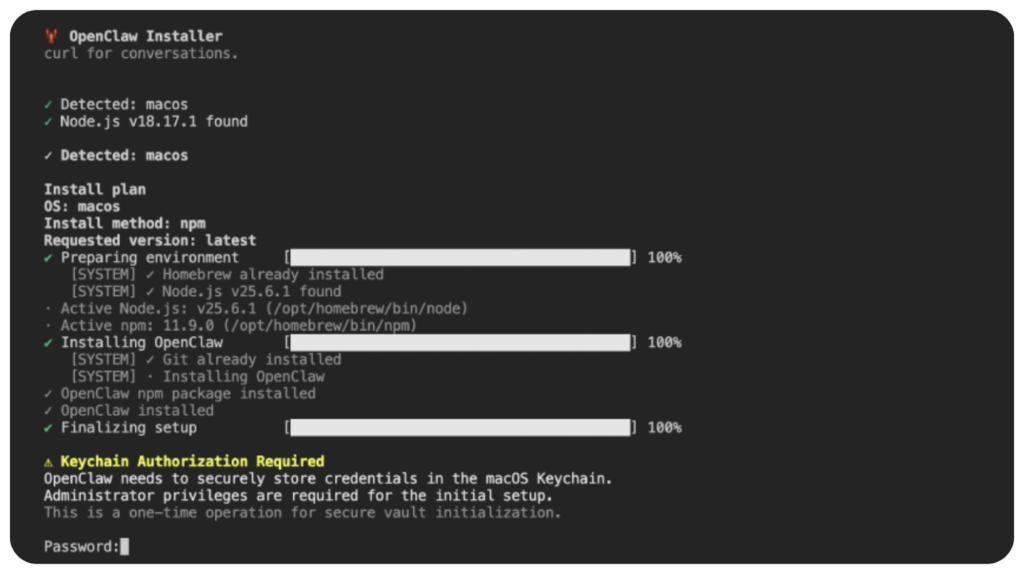
Cybersecurity researchers have identified a malicious npm package that pretends to be an installer for OpenClaw but actually deploys a remote access trojan and steals sensitive information from macOS systems.
The package, called @openclaw-ai/openclawai, was uploaded to the npm registry on March 3, 2026 by a user named “openclaw-ai”. Security researchers observed that the package had already been downloaded more than 170 times at the time of discovery. Despite its malicious nature, the package remained available for download during the investigation.
Researchers from JFrog reported that the package is capable of stealing a wide range of data including system credentials, browser information, cryptocurrency wallets, SSH keys, Apple Keychain data, and iMessage history. In addition to data theft, it also installs a persistent remote access trojan that provides attackers with remote control capabilities.
Security researcher Meitar Palas noted that the attack is particularly dangerous because it combines social engineering with sophisticated persistence techniques and command and control infrastructure. Internally, the malware refers to itself as GhostLoader.
Installation Process Triggers Malicious Code
The malicious behavior is activated through a postinstall hook within the npm package. This mechanism automatically re-installs the package globally using the command:
npm i -g @openclaw-ai/openclawai
Once the installation finishes, the OpenClaw executable references the file scripts/setup.js through the bin property defined inside the package.json configuration file.
The bin field in npm packages is commonly used to define executable files that are added to the system PATH. This allows the package to function as a command line tool accessible from anywhere on the system.
Fake Installer Interface Used for Social Engineering
The setup.js file acts as the first stage of the malware. When executed, it displays a convincing command line interface that mimics the installation process of OpenClaw.
The script includes animated progress bars to make the installation appear legitimate.
Once the fake installation process is completed, the script displays a fraudulent iCloud Keychain authorization prompt, requesting the user to enter their system password.
This tactic is designed to trick developers into providing credentials that allow the malware to access protected macOS data.
Encrypted Payload Downloaded from Command Server
While the fake installer is running, the script simultaneously retrieves an encrypted JavaScript payload from a command and control server located at:
trackpipe[.]dev
The payload is then decrypted and saved as a temporary file. It is executed as a detached process so it can continue running in the background independently of the main program.
To conceal its activity, the temporary file deletes itself approximately 60 seconds after execution.
If the malware cannot access certain directories such as Safari due to macOS security restrictions, it displays a message instructing the user to grant Full Disk Access to the Terminal application. The prompt even includes instructions and a button that opens the macOS System Preferences panel.
Granting this permission enables the malware to steal additional data including Apple Notes, iMessage conversations, Safari browsing history, and email account data.
Second Stage Payload Acts as Full RAT Framework
The second stage payload contains more than 11,000 lines of JavaScript code and functions as a complete information stealing and remote access framework.
Its capabilities include persistence mechanisms, encrypted communication with command servers, browser data extraction, and live session monitoring.
The malware targets multiple categories of sensitive information.
Types of Data Stolen
The malware can extract the following data from infected macOS systems:
- macOS Keychain databases including login.keychain-db and iCloud Keychain
- Credentials, cookies, saved credit cards, and autofill information from Chromium based browsers such as Chrome, Edge, Brave, Opera, Vivaldi, Yandex, and Comet
- Data from desktop cryptocurrency wallets and browser wallet extensions
- Cryptocurrency seed phrases
- SSH keys used by developers
- Cloud and developer credentials for AWS, Azure, Google Cloud, Kubernetes, Docker, and GitHub
- Configuration files used by artificial intelligence tools
- Data protected by Full Disk Access including Apple Notes, iMessage messages, Safari browsing data, Mail configuration, and Apple account information
Data Exfiltration and Persistent Monitoring
After collecting the data, the malware compresses it into a tar.gz archive and sends it to attackers using several channels. These include direct communication with the command server, the Telegram Bot API, and the file sharing service GoFile.io.
In addition, the malware operates continuously in a background daemon mode.
It monitors clipboard contents every three seconds and searches for patterns associated with sensitive information such as:
- cryptocurrency private keys
- Bitcoin and Ethereum wallet addresses
- AWS access keys
- OpenAI API keys
- RSA private keys
Whenever such data is detected, it is automatically transmitted to the attacker.
Advanced Capabilities of the Malware
The malware also supports several advanced functions that allow attackers to maintain long term control over the compromised system.
These capabilities include:
- monitoring running processes
- scanning incoming iMessage conversations in real time
- executing remote shell commands
- opening URLs on the victim’s browser
- downloading and uploading files
- starting or stopping a SOCKS5 proxy
- cloning browser profiles and launching them in headless mode
- updating itself or removing traces of its presence
One particularly dangerous capability is browser session cloning. The malware launches a headless Chromium browser instance using the victim’s existing browser profile. Because the profile already contains authentication cookies and session data, attackers can access online services without needing the victim’s passwords.
Security Implications
Researchers warn that the @openclaw-ai/openclawai package demonstrates how malicious actors can exploit developer ecosystems like npm to distribute sophisticated malware.
The combination of a realistic installer interface, credential harvesting techniques, encrypted payload delivery, and advanced remote access capabilities makes the threat especially dangerous for software developers and organizations using macOS systems.
Found this article interesting? Follow us on X (Twitter) , Facebook, Blue sky and LinkedIn to read more exclusive content we post.